Build a knowledge base once
Upload PDFs and Sharper parses and indexes them into a reusable, searchable collection you can browse by document, concept, and graph views.
Free AI knowledge base Q&A tool
Build a knowledge base from your documents, ask in plain English, and get an answer grounded in your files, with the source passage highlighted in the PDF so you can verify it in one click.
A grounded answer with the source highlighted
Knowledge base question
Prefilled with the sample handbook walkthrough
Knowledge base source
SampleEmployeeHandbook.pdf
Sample HR handbook · policies and benefits · PDF
The handbook from our walkthrough. Add it to a knowledge base rather than attaching it to the task: cited answers with highlighted PDF passages come from knowledge base documents. Then select the knowledge base in the task and ask.
Prompt
Free to start: the task runs on Sharper's Free plan. If you are not signed in, you will be asked to create a free account first.
Use it when the answer already lives somewhere in your files: handbooks, policies, research papers, or product documents, and you need it back in seconds instead of pages of search results.
Upload PDFs and Sharper parses and indexes them into a reusable, searchable collection you can browse by document, concept, and graph views.
Type a plain-English question, like the vacation policy for a new hire, and get an answer drawn from the handbook instead of a generic guess.
Every answer cites its source. Open the citation and the exact passage is highlighted in the PDF preview, so checking the answer takes one click.
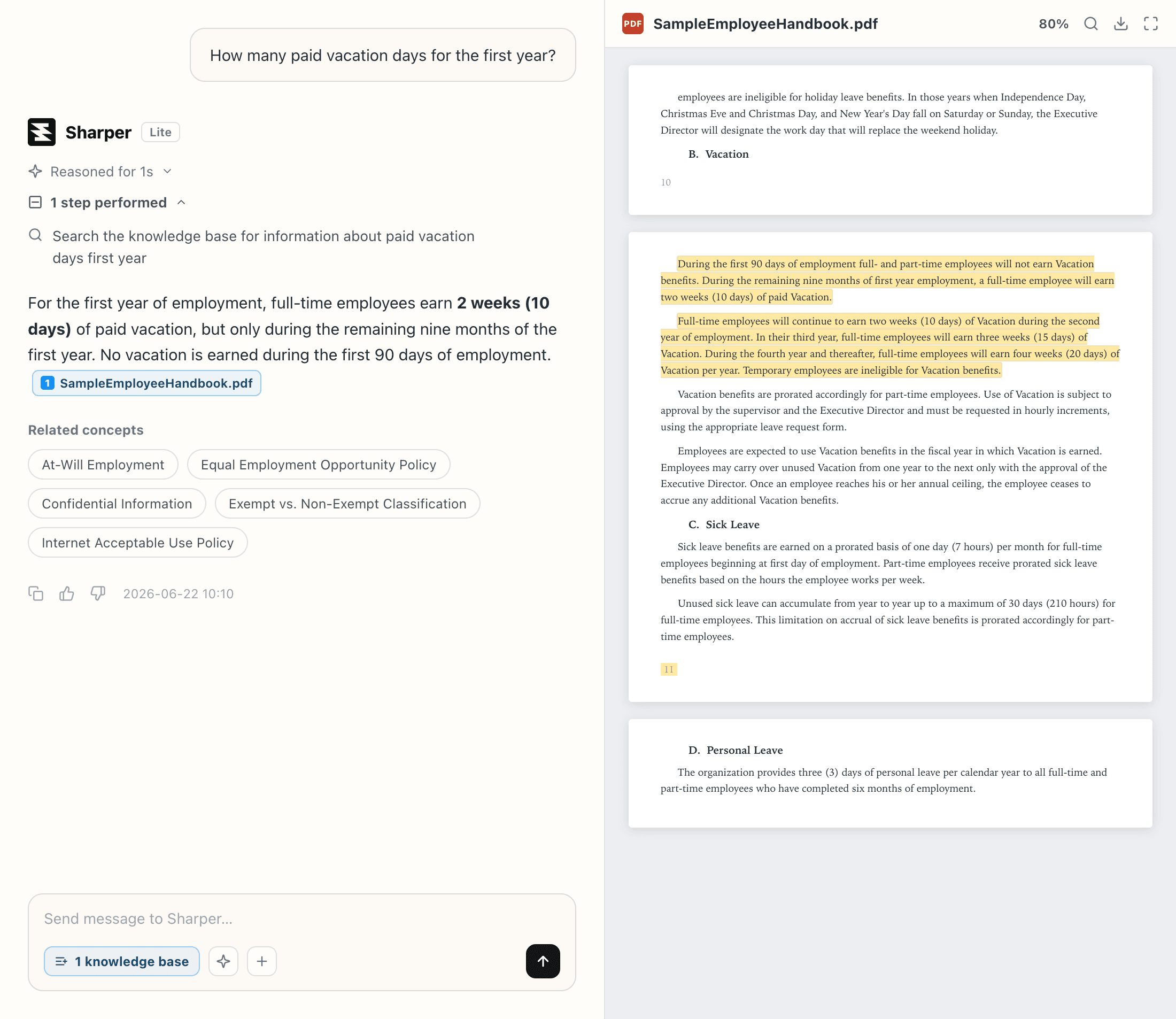
Search returns pages. A generic chatbot guesses. Sharper answers from the knowledge base you select and shows the evidence behind every response.
Sharper searches only your selected sources, so every response comes from your documents rather than model memory or the open web.
Each answer carries source context, and the cited passage opens highlighted in the PDF preview: the difference between trusting a bot and checking it.
Knowledge bases live with your organization. Add and maintain the source set once, then reuse it across tasks and teammates.
Practical details about using Sharper for knowledge base question answering.
It lets you ask natural-language questions across uploaded files and receive answers grounded in those documents, with source context and related concepts available for verification and follow-up.
PDFs and documents of very different kinds side by side: in our walkthrough, one knowledge base holds two research papers, a school handbook, and an employee handbook.
Sharper answers only from the knowledge base you select, so responses are grounded in your documents. Each answer shows its source, and the cited passage opens highlighted in the PDF.
Open the citation under the answer. Sharper shows the source document in the PDF preview with the exact supporting passage highlighted. These highlighted citations come from documents indexed in a knowledge base, so add your PDF to a knowledge base instead of attaching it to the task.
Yes. Knowledge bases live with your organization, so teams work from the same indexed sources and reuse them across tasks instead of re-uploading files.
Yes. The task runs on Sharper's Free plan, which includes 300 credits per week. Paid plans add more credits and capacity for heavier use.
Yes. Sharper searches the whole selected knowledge base, extracts shared concepts, and maps how documents connect, so one question can draw on several sources.
Build a knowledge base, ask in plain English, and check the highlighted source behind every answer.